 Wedding Budget & Vendor Kit
Your wedding budget, every vendor, and every payment due date.
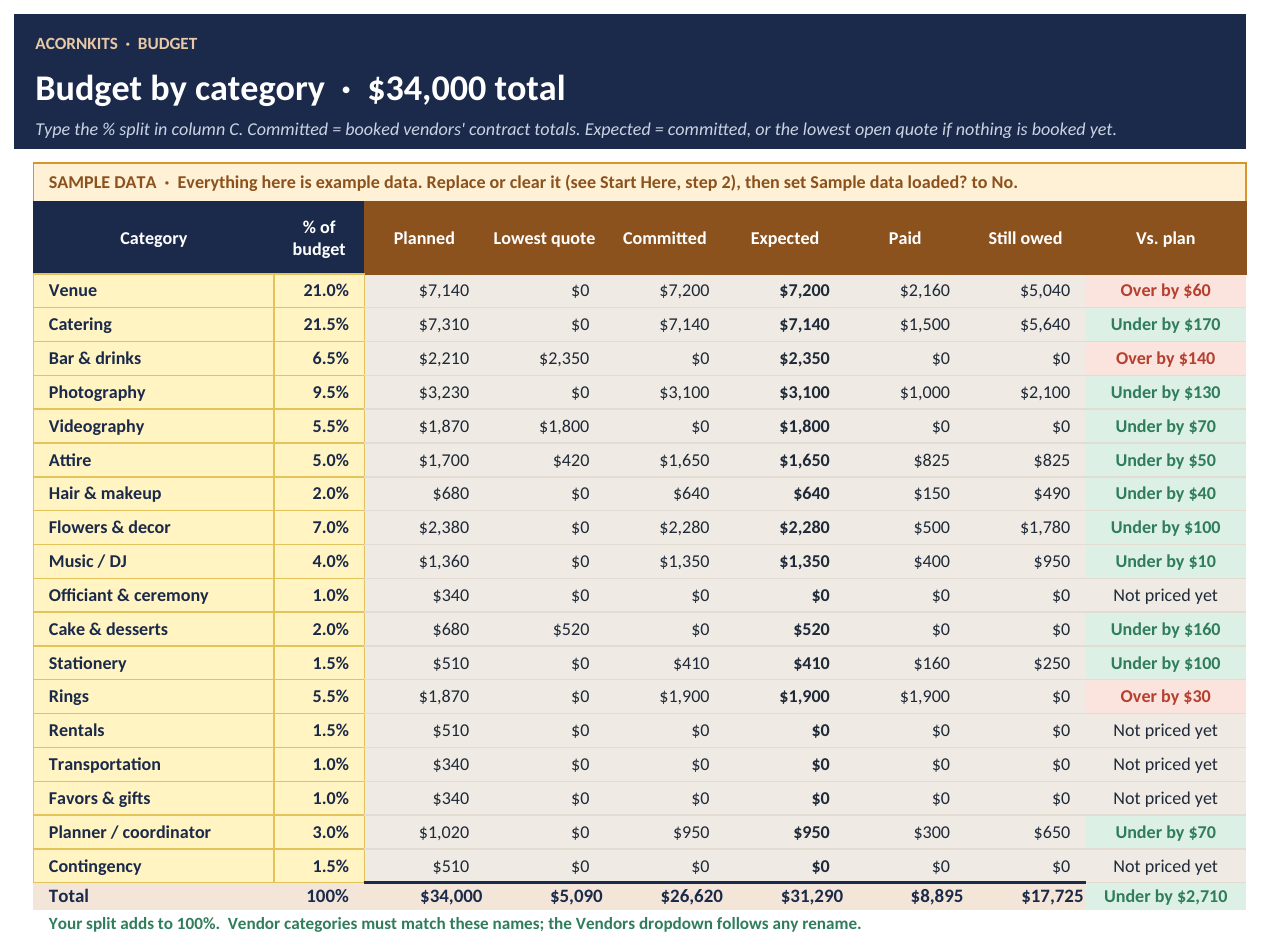
Wedding Budget & Vendor Kit is one Excel and Google Sheets workbook for planning your wedding spending. Set a budget across 18 categories, track every vendor's quote and contract, see which payments are overdue or due soon, and keep your guest list and RSVPs next to the catering numbers.
- Excel + Google Sheets
- No macros
- SAMPLE data included
- One-time $14
Sound familiar?
Deposits everywhere
Each vendor has its own deposit, installments and final balance, all due on different dates.
"Are we over budget?"
Quotes and contracts change, so it's hard to tell where the total really stands.
The expensive months
Several big payments can land in the same month without warning.
Headcount vs catering
RSVPs keep moving, and the caterer needs a number.
What's inside
One .xlsx workbook with 6 sheets, plus a printable How-to-Use PDF and a README. SAMPLE rows come pre-filled so you can see how everything works before you add your own data.
Start Here
Couple, wedding date, total budget and guest count, plus a quick start.
Dashboard
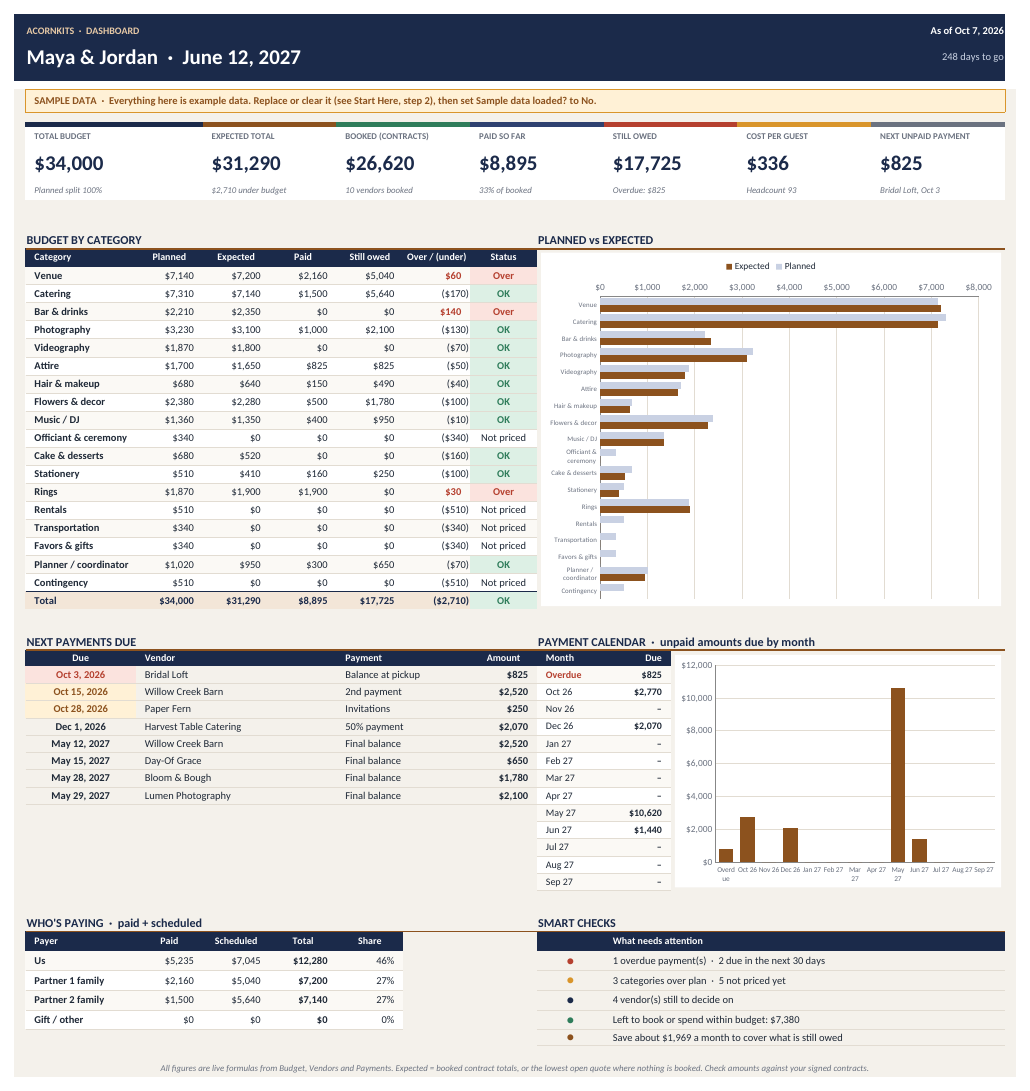
Budget vs expected cost, booked, paid so far, still owed, cost per guest and days to go, with the next payments, a 12-month payment calendar and smart checks.
Budget
18 categories with your own % split, planned, lowest quote, committed, expected, paid, still owed and over / under flags.
Vendors
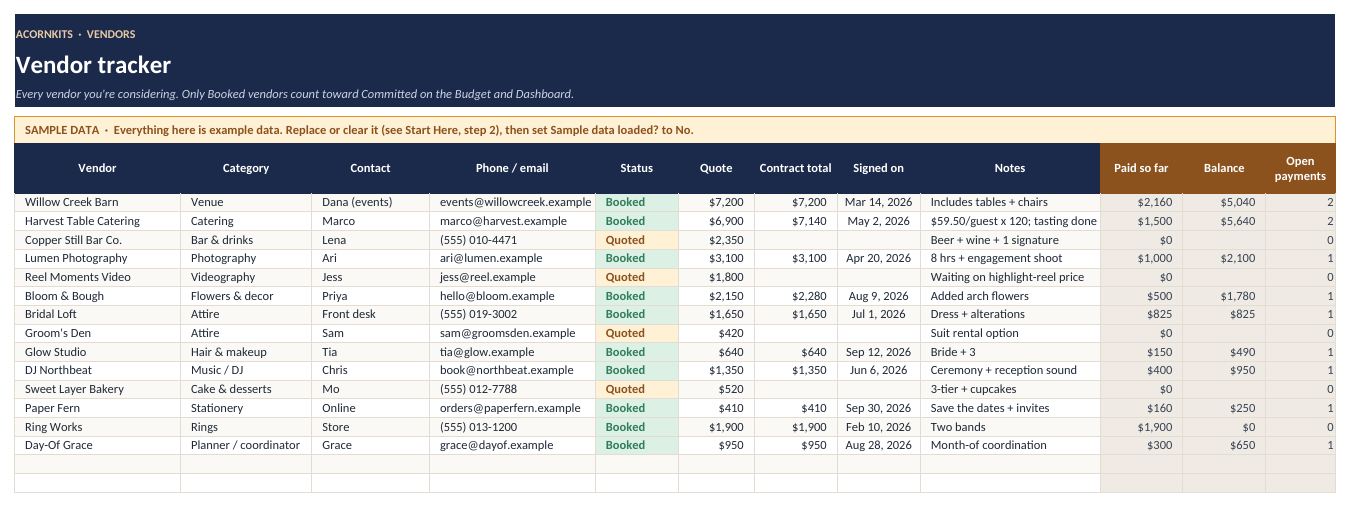
A 100-row vendor tracker with status (researching, quoted, booked), quotes, contract totals, paid so far and balance.
Payments
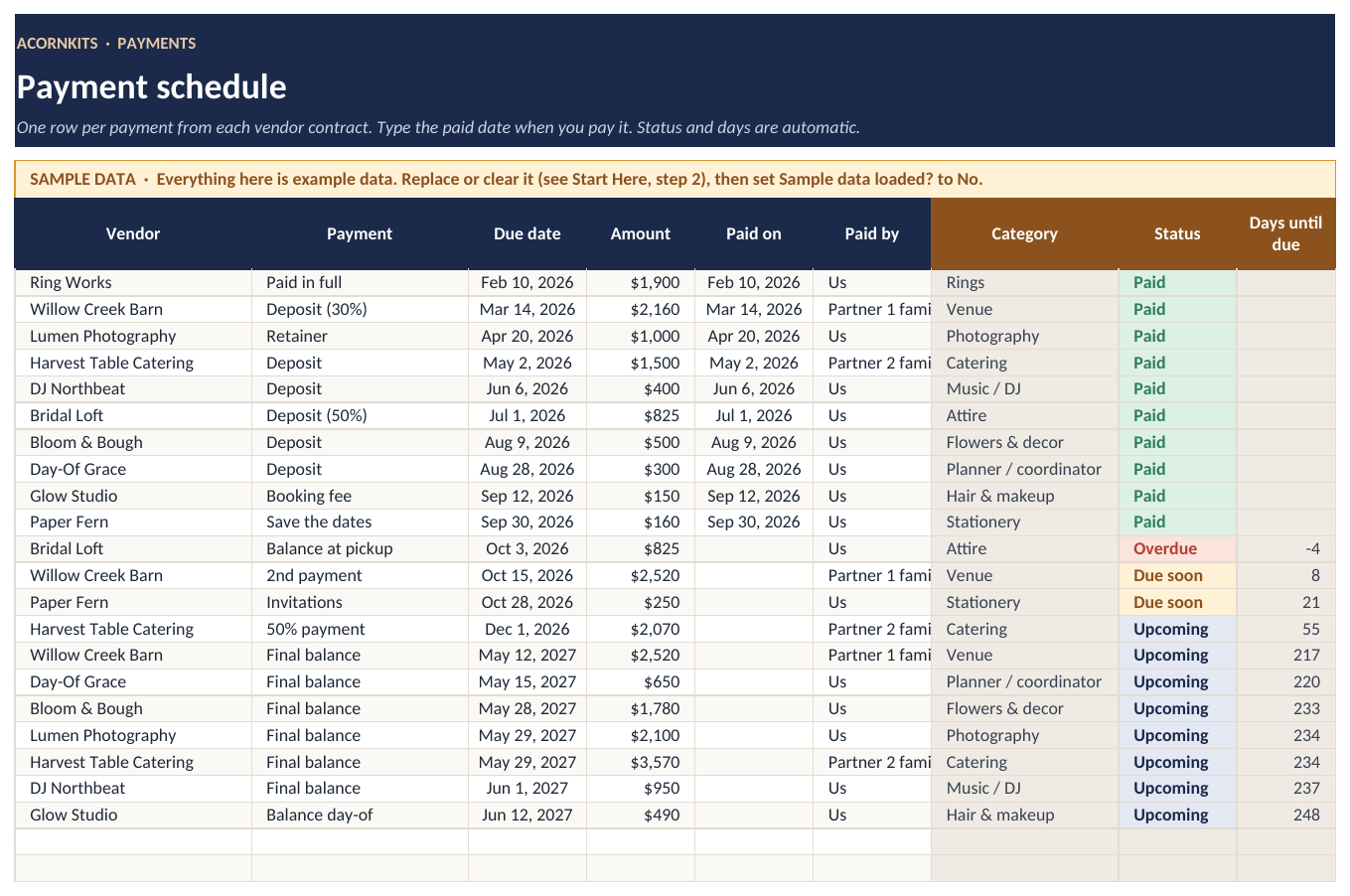
A 300-row payment schedule. Each payment shows Paid, Overdue, Due soon or Upcoming on its own.
Guest List
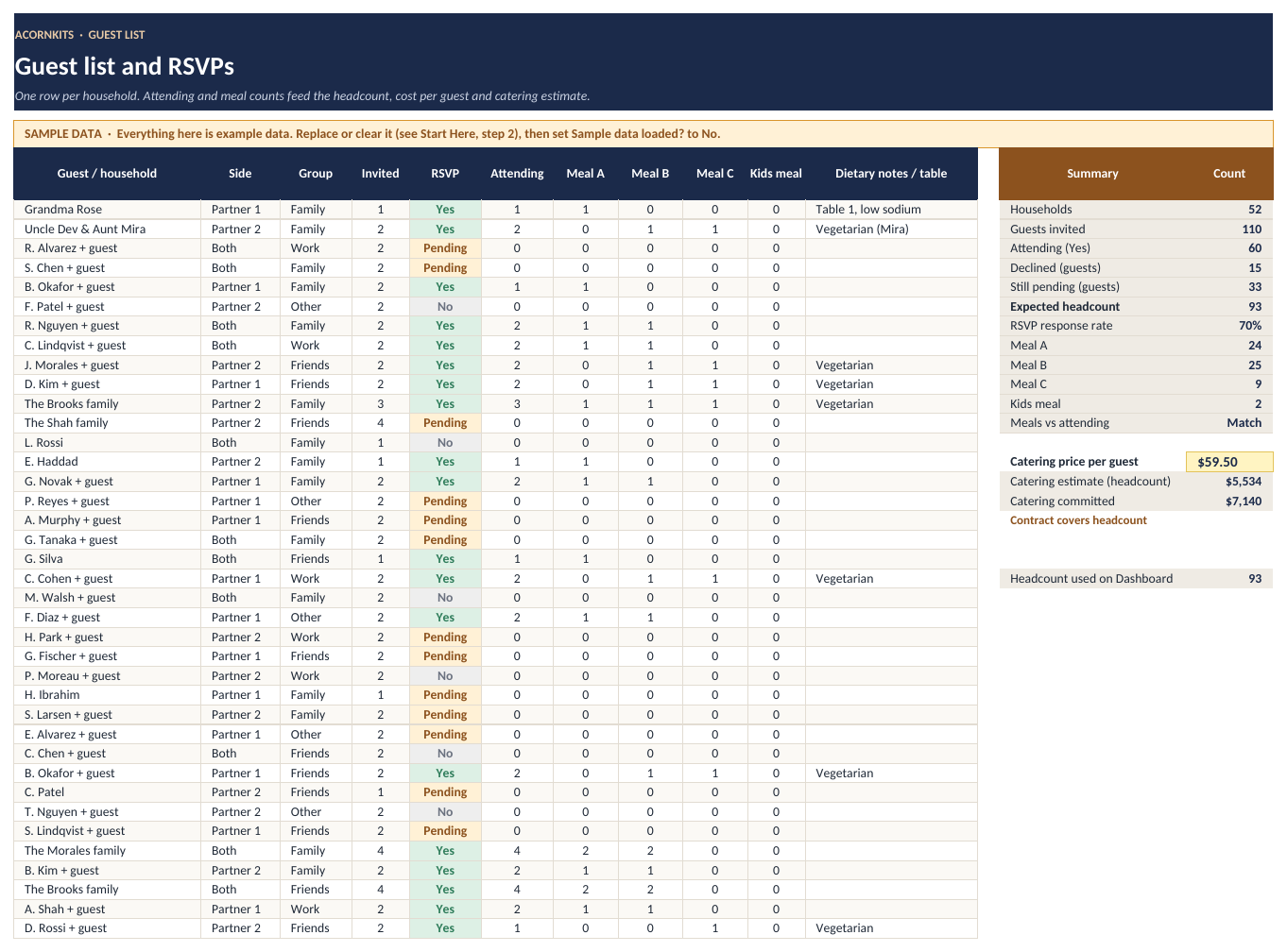
Households, RSVPs, meal counts, headcount and a check against your catering contract.
See the actual workbook
These are renders of the real file with its SAMPLE data, made in LibreOffice. Fonts and colors look slightly different in Excel and Google Sheets. Tap any image to see it full size.

Is it a good fit?
Good fit for
- Engaged couples planning their own wedding budget
- Families sharing the costs who want to see who's paying for what
- Anyone juggling several vendor deposits and due dates
- People who'd rather use a spreadsheet than a wedding app
Not a fit for
- Professional planners who need multi-client software
- Anyone who wants automatic payment reminders by email or text. Alerts show inside the workbook only.
- Anyone looking for a recommended budget. The example split is a starting point you change.
FAQ
Is the budget split a recommendation?
No. The example % split is a starting point you can change to fit your plans.
Will it remind me when a payment is due?
Inside the workbook, yes: payments switch to Due soon and Overdue based on today's date. It doesn't send emails or texts.
Can it split costs between families?
Yes. Tag each payment with who's paying, and the Dashboard totals what you and each family have paid and still owe.
Does it work in Excel or Google Sheets?
It works in both. It's a standard .xlsx file built on common formulas, with no VBA. In Excel, just open the file. For Google Sheets, upload it to Google Drive and choose Open with Google Sheets (a free Google account works).
Are there macros?
No. There are no macros, scripts or add-ons, so it opens fine on locked-down work computers and in Google Sheets.
Is there sample data?
Yes. Every sheet comes filled with clearly marked SAMPLE data so you can see how it works. The Start Here tab lists exactly which ranges to clear when you're ready for your own numbers.
How do I get the file?
After you pay, Stripe takes you straight to a download page. The link is also on your Stripe receipt, so you can download the file again later.
What's your refund policy?
If the file won't open or is defective, contact us within 14 days of purchase and we'll refund you. Because it's an instant digital download, we don't offer refunds for change of mind. See the refund policy.
What can I do with it under the license?
It's licensed for personal use by one household. You can edit it for your own use, but you can't resell, share or redistribute the template files. See the terms.
Plan the spending without surprises
6 sheets, SAMPLE data to learn from, works in Excel and Google Sheets.
Wedding Budget & Vendor Kit is a planning tool. Check amounts and due dates against your vendor contracts.